Count the spaces you share.
List desks, meeting rooms and parking bays separately from employee accounts.
Check your Core allowance →
Desk booking software for shared offices. Find desks on your floor plan, check amenities and reserve the time you need.
Core: $149/month · 50 spaces · up to 250 users
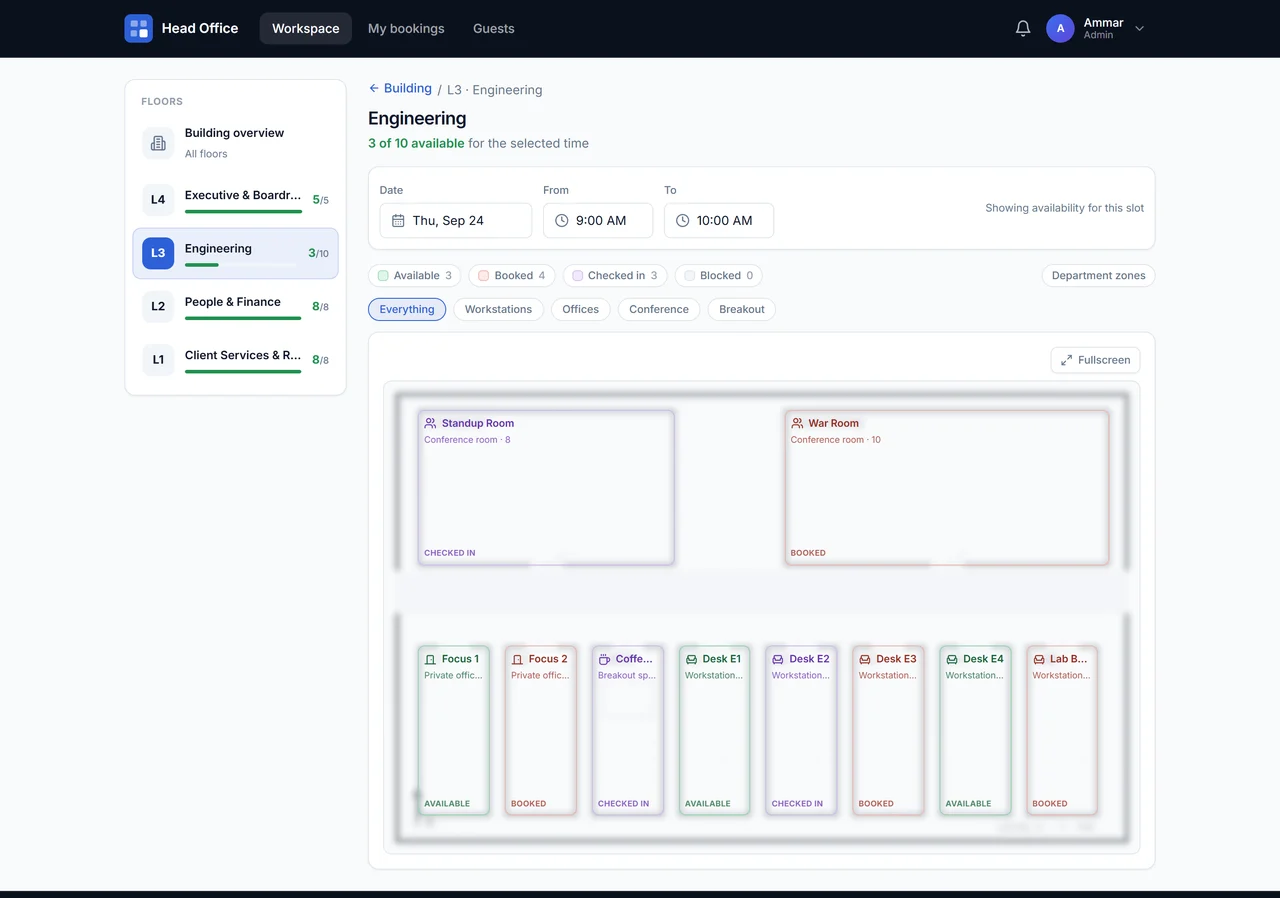
Desk sharing means different colleagues use the same workstations at different times. Desk booking software adds a reservation record, so people can choose a desk before coming into the office.
In SmartSpace, employees find desks on your floor plan, review their amenities and reserve the time they need. Administrators keep the spaces and standard booking rules current. The same workspace also holds meeting rooms and parking bays.
For example, a colleague coming in on Tuesday can choose a desk near the team’s usual area, find the reservation in My bookings and cancel it if plans change. This is an illustrative workflow, not a customer result.
Setting up shared desks for the first time? Read how a hot desk booking system works, then use the small-office setup guide to plan your pilot.
Start with the spaces, rules and budget your office needs.
List desks, meeting rooms and parking bays separately from employee accounts.
Check your Core allowance →Decide how colleagues reserve, cancel and handle exceptions before your rollout.
Read the policy template →Use a small group to evaluate the workflows your office will rely on.
Open the trial checklist →Show employees where a desk is, what equipment it has and which area it belongs to before they reserve.
Give administrators control over booking windows, durations and recurring reservations using the standard rules that fit your office.
Give employees clear check-in and cancellation rules so shared desks are available when colleagues need them.
On a Tuesday office day, an employee chooses a desk near the team’s usual area. They reserve the time they need and find the reservation again in My bookings. If plans change, cancellation makes the space available to someone else. For a team discussion, explore meeting room booking in the same platform.
For a team sharing desks across the week, follow the hybrid-office booking guide. If you are setting up a new location, use the office-move booking checklist to prepare spaces and test reservations before move-in day.
Hot desking means people share desks rather than own one permanently. Desk booking adds a reservation process so employees can plan ahead.
Desk sharing describes how colleagues use shared workstations; desk booking describes how they reserve them. Products may use either name. Compare the actual workflow: choosing a desk, reserving a time, finding the booking and cancelling it when plans change.
Yes. Define booking windows, cancellations and exceptions before rollout. Our policy template gives your office a practical starting point.
Prepare a list of shared desks, an office administrator and a small group of colleagues. Create your workspace, add your desks and test a reservation, cancellation and the rules your team uses.
Yes. Shared desks can be useful whether colleagues come in every day or follow different schedules. Start with the desks your team shares and set rules for your office. See office booking use cases.
Count the desks, rooms and parking spaces you need, then compare the pricing basis, included workflows, setup and add-ons. Our desk booking cost guide includes a worked example; SmartSpace pricing explains what is included. Use the desk booking software comparison to evaluate the same requirements across vendors.
Try desks, rooms, parking and visitors in one workspace.