
Meeting room booking with rules that hold
Meeting room booking here starts from the same floor plan as everything else: rooms recolour for the time range you pick, booking one asks for an agenda and the attendees you name, and a room nobody checks into inside the grace window is released rather than sitting dark with somebody's name on it.
Core: $149/month before tax for one office, 50 bookable spaces and up to 250 users. Start with a 30-day free trial.
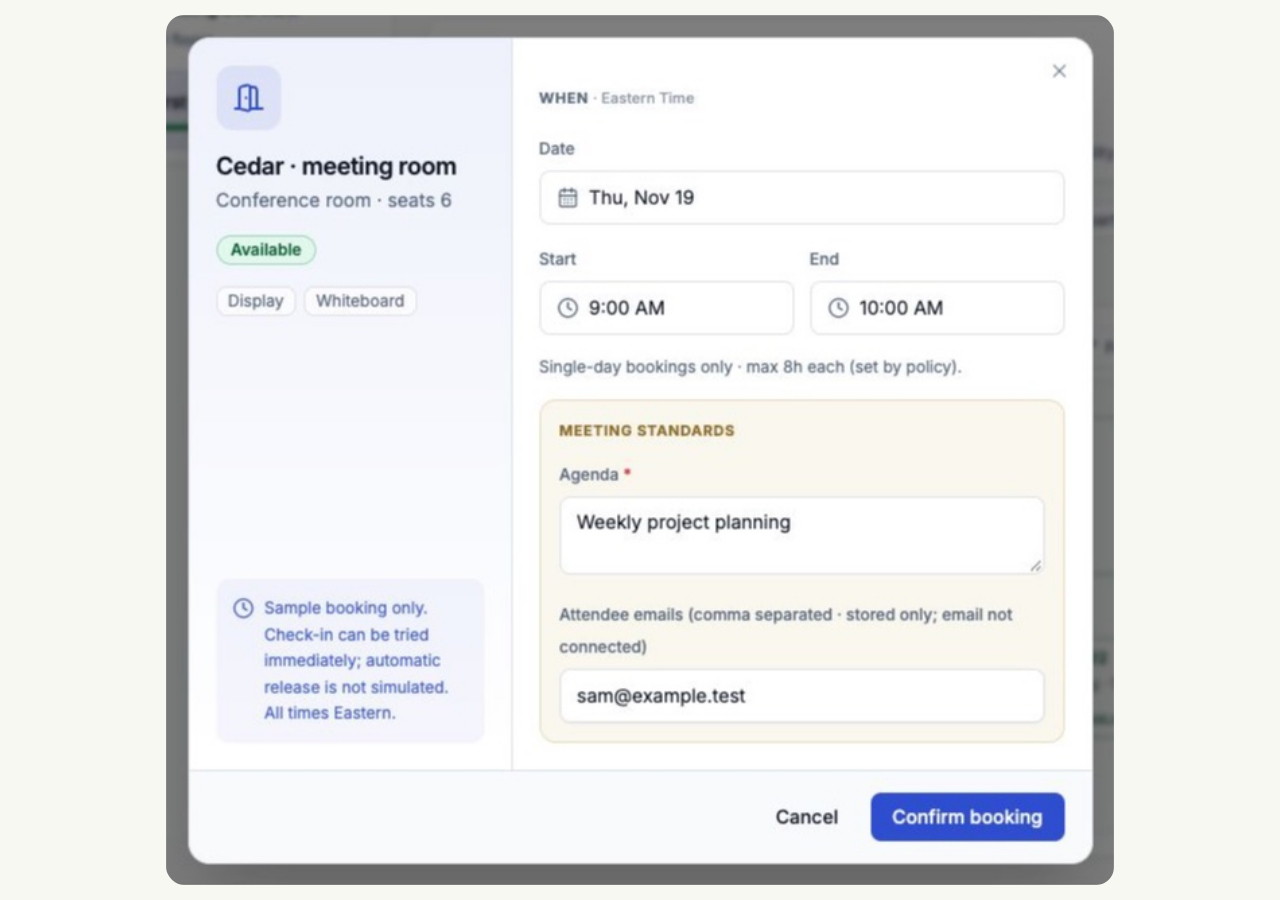
The dialog asks for what a room booking needs
The room-booking dialog collects an agenda, attendee email addresses and recurrence options. Room capacity is displayed to help the person booking choose a suitable space; it does not automatically match the room to the number of attendees.
- A one-line agenda, required on rooms and never asked for on desks
- Attendee email addresses recorded with the booking; test calendar delivery separately
- One-time, daily, weekly or specific weekdays, for up to 26 weeks
- Capacity and amenities shown on the room, so a two-person meeting can see it is taking the twelve-person room
Evaluate your calendar workflow
Evaluate the calendar connection your office needs during the trial. Confirm account permissions, attendee invitations, booking updates and cancellation behavior with your actual Microsoft Outlook Calendar or Google Calendar setup before rolling it out to the team.
Empty rooms are the failure everyone notices
An unused desk is invisible from the corridor. An unused room with the lights off and a name on the door is the thing people point at when they say the booking system does not work. Rooms deserve a tighter check-in window than desks, and anything not checked into is released back onto the plan.
- A configured check-in window for office bookings
- Approval requirements for the configured space types
- Review pending booking requests through office administration
- No-show and cancellation rates reported per person and per department
Questions about meeting room booking
Can we stop small meetings taking the big room?
Room capacity is displayed while booking, so employees can choose a suitable room. Matching meeting size to room size is an office policy; SmartSpace does not automatically reject a small meeting because the room has more seats.
Does it work with Outlook?
Microsoft Outlook Calendar is listed among the workplace integrations. During the trial, confirm your account connection and test invitations, booking changes and cancellations in the environment your team will use.
What happens if nobody turns up?
The booking is released after the grace window and the room goes back on the plan. It also shows up in the reports as a no-show, which is the number worth watching if rooms feel scarce.
Related features
- Desk booking
Desk booking on your own floor plan. SmartSpace Core is $149/month for one office, 50 spaces and up to 250 users, with a 30-day trial.
- Visitor management
Register expected guests and walk-ins, send guest invitations when an email is supplied, and record visitor arrivals and departures.
Further reading
- Meeting room booking rules that stop the big room being used by two people
Four rules that keep meeting rooms available to the meetings that need them, and why capacity matching matters more than any of the others.
- Why desk booking fills up with no-shows, and how to stop it
No-shows make a booking system untrustworthy faster than any bug. The causes are usually configuration, not people, and there are four settings that fix most of it.